The Brivo integration works with 8 key settings detailed below.
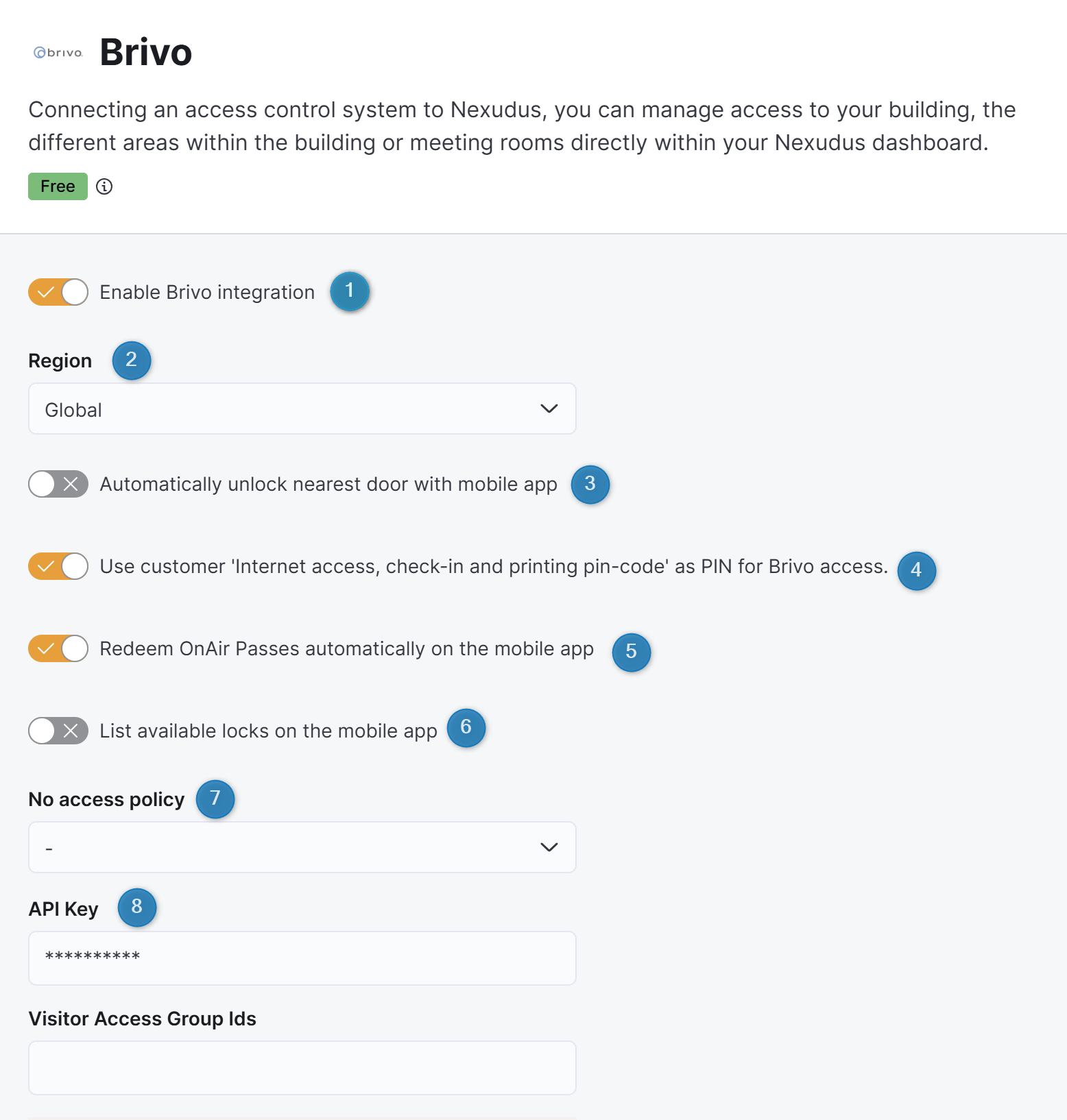
Enable Brivo integration
This toggle controls whether the integration is on or off. Toggling this off cuts the connection between Nexudus and Brivo. No more user or access sync will happen until you toggle it back on and reconnect the integration.
Region
This dropdown menu lets you select the region where your Brivo account is located. Select Europe if your space is located in Europe and Global if you're located anywhere outside of Europe.
Doc Preview
This documentation includes upcoming features that aren’t available in your account yet. They’ll be rolling out over the next few weeks.Automatically unlock nearest door with mobile app
This toggle lets Brivo automatically attempt to unlock the door closest to the customer as soon as they open the Brivo app. Customers no longer need to take more action when this setting is toggled on.
Recommended if most of your customers have access to most doors, and you want the fastest possible experience.
If customers don't have access to the nearest door, the unlock attempt fails, and they get an error message.
Keep this option toggled off if you don't allow it in your Brivo account, or your door access varies a lot between customers. In that case, automatic unlock attempts will fail often fail and create unnecessary frustration.
Use customer 'Internet access, check-in and printing pin-code' as PIN for Brivo access
This toggle lets you make the customer's default PIN in Nexudus the PIN code they can use to unlock Brivo doors. This means customers use one single PIN for both Nexudus and Brivo.
Recommended only if your space uses PIN-based door locks and you want the simplest possible experience for customers, with one PIN to remember.
Keep this off if you don’t use PIN locks or you prefer to keep Brivo door access PINs separate from Nexudus PINs for security or operational reasons.
Redeem OnAir Passes automatically on the mobile app
This toggle automatically adds and activates Brivo in Passport and its white-label equivalents for customers who have door access. Customers can unlock doors immediately, without going through the Brivo login or setup flow.
Recommended if you want the easiest and smoothest experience possible, with door access available immediately and no setup required for your customers.
Keep this option toggled off if you want customers only to use the Brivo app to unlock doors.
List available locks on the mobile app
This toggle lets you display the list of all the locks the customer can unlock when they press the Unlock door tile on Passport and its white-label equivalents. Toggle this off to have customers press the tile to unlock doors without displaying the list.
No access policy
This dropdown menu lets you define what happens to the Brivo user account of customers when they no longer have door access from their purchases.
These options affect both access behavior and Brivo licensing costs.
Brivo OnAir licenses are billed per active mobile pass. Suspended users may still count toward your active license total unless their mobile pass is removed.
🔵Suspend Brivo account users
Suspends Brivo users linked to customers who no longer have door access.
If customers regain access through a purchase (pass, membership, or booking), we automatically unsuspend their Brivo users.
Any existing Brivo OnAir mobile pass is kept and still counts toward your active Brivo OnAir license total even if they're not being used.
Recommended if you expect customers to regain access frequently and are not constrained by Brivo OnAir license limits.
🔵Delete Brivo account users
Permanently deletes Brivo users and their associated mobile passes when customers lose door access.
If customers regain access through a purchase, we automatically create new Brivo users and mobile passes.
Deleted users and passes do not count toward Brivo licensing but their access history is lost and cannot be restored.
Recommended if your customers are unlikely to return, you don't mind losing their access records in Brivo, and you want the lowest possible ongoing Brivo costs.
🔵Suspend Brivo account users and remove Mobile pass
Suspends Brivo users and removes their mobile passes when customers lose door access.
If customers regain access through a purchase, we automatically unsuspend their Brivo users and issue new Brivo OnAir passes.
Removed passes no longer count toward your active Brivo OnAir license total.
Recommended if you pay for a more limited number of Brivo OnAir passes and only a subset of customers need daily access.
API Key
This field lets you add the API key required to connect your Brivo account to Nexudus when enabling the integration.
You don't need to update this key after your initial setup unless you switch to a new Brivo account or change your key for security reasons.
Visitor Access Group Ids
This field lets you give visitors access to your space by adding the IDs of Brivo door access groups. These groups should include the doors that visitors need to unlock to access your space.
Any registered visitor of your space will be granted access to all the doors included in the selected groups.