You can easily link any existing package for one of your floor plan units to an existing proposal in a few clicks on the Admin Panel.
Check out how to create a proposal instead.
Adding a package to a proposal is a great way to override the default price of the plan you link to the proposal and to ensure that occupancy is accurately recorded.
It's also a great way to upsell additional services or more access as part of your sales proposals.
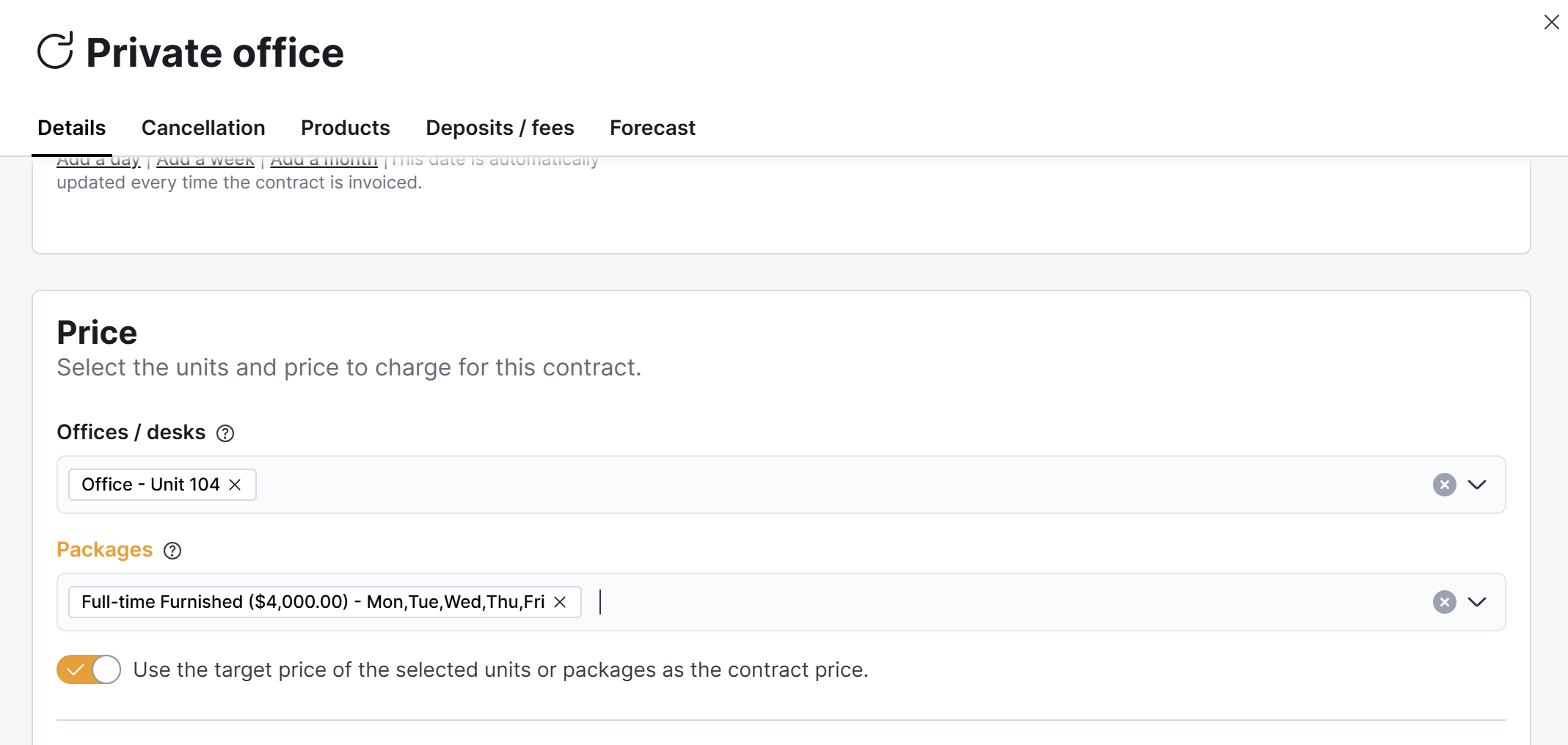
For example, linking a unit package to an office lease proposal to include furniture.
For example, if you offer a part-time office or desk Monday to Wednesday, make sure the contract access passes and benefits match the package's availability.
Log in to dashboard.nexudus.com if you aren't already.
- Click CRM > Proposals.
- Click on the relevant proposal.
- Click on the Plans tab and then on the relevant plan.
- Scroll down to the Price section and select the relevant unit from the Offices / desks
drop-down. - Select the unit Package to link to the proposal plan.
You can connect the same unit package to multiple proposals, but remember that the first proposal accepted wins the unit package.
- Toggle on Use the target price of the selected units or packages as the contract price if you'd like to override the plan's price with the unit's target price.
Click the Save Changes button.
All set! You can now edit the proposal, have an preview of the full proposal, or just send it to customers.