Customers can easily enquire about specific plans to express their interest before signing up. They also have the option to request a tour with their plan enquiry.
Enquiring about Plans
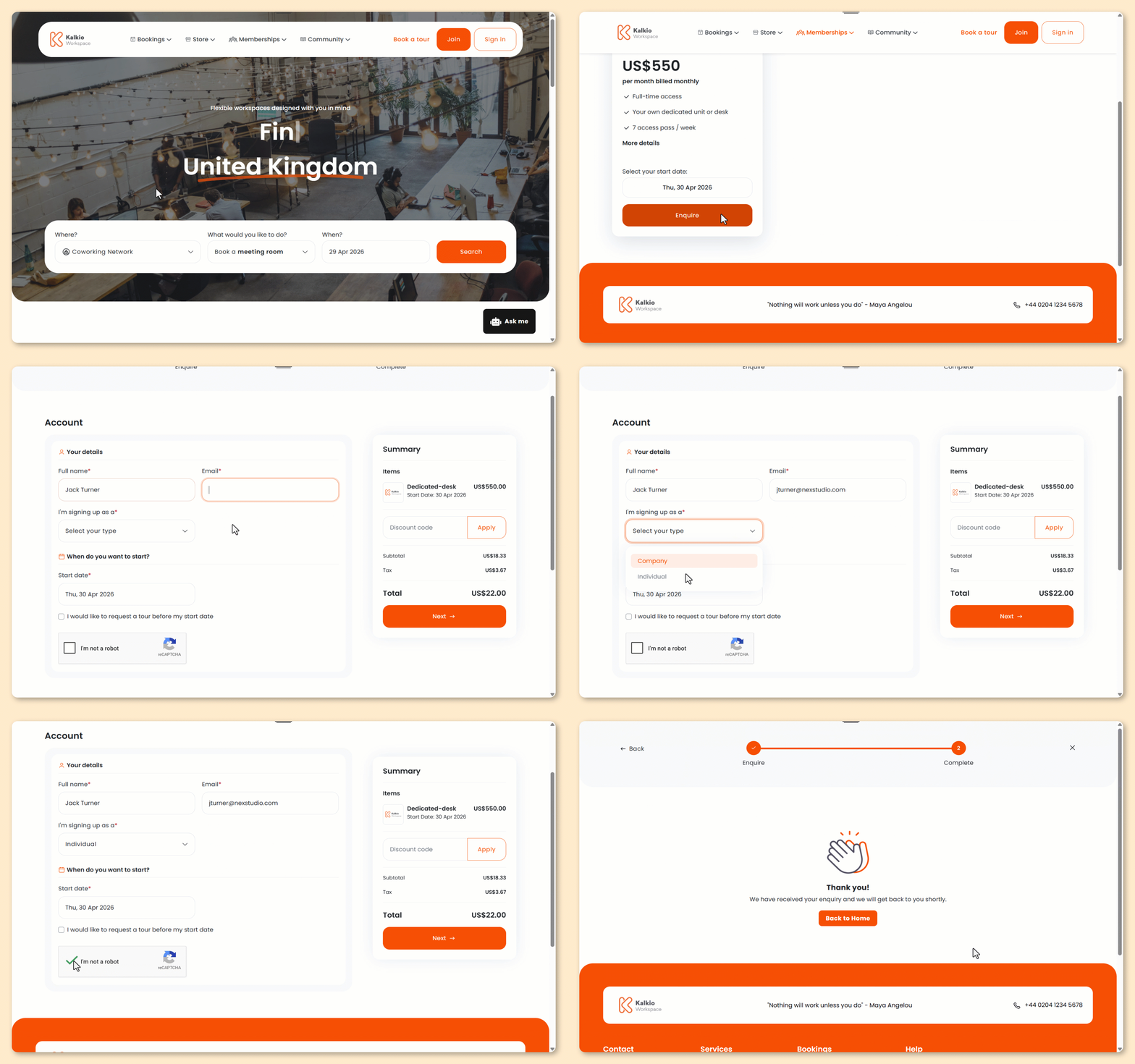
Customers can express their interest in specific plans by filling out a quick form on the Members Portal.
If you've customized your portal, the steps for your customers may be different.
- From the Members Portal home page, click on the Memberships tab.
- Select a plan kind.
If your space doesn't offer a specific kind of plan, it won't be available as an option.
- Select your preferred start date for the plan you're interested in.
- Click Enquire.
- Add your Full name.
- Add your Email.
- Under I'm signing up as a, select your customer type.
You can disable this field if you'd like all customers to sign up as individuals from the Members Portal.
- Select if you'd like to request a tour.
- Click Next.
If you chose to request a tour, you'll be taken to the tour request form.
If you didn't request a tour, you'll be taken to the confirmation page.
All set! The plan enquiry has been submitted.
Whenever a plan enquiry is submitted, you'll receive an email notification from Nexudus with a link to the auto-generated proposal.
You can also access the potential customer's contact information from their customer record and reach out to discuss their interest. The potential customer won't hear anything from Nexudus until you reach out to them.