Passport Version 5 will begin a phased release mid-August 2026.
Customers can join plans in a few taps from the Passport app.
Only customers with an account can join plans using the Passport app.
For example, a contact wants to become a member.
Customers without an account can always enquire about or join plans using the Members Portal.
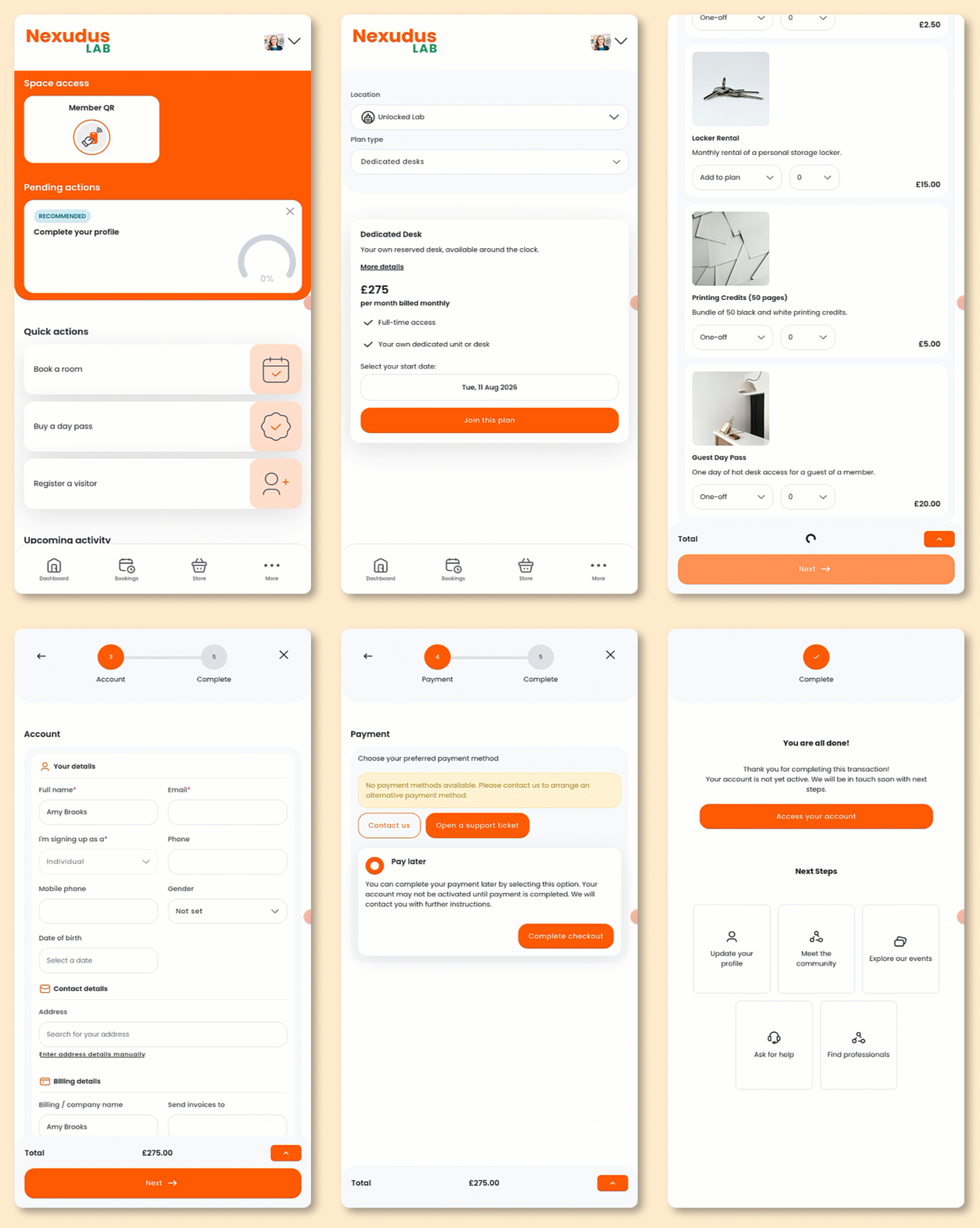
Open the Passport app if you haven't already.
- Tap Memberships from the navigation bar.
- Select the kind of plan you'd like to sign up to.
Plans are sorted by kinds in the Passport app and Members Portal 5.
Make sure all your plans have kinds.
To define a plan kind, open the plan record and select a kind from the drop-down menu.
- Select the date you'd like to start your plan.
- Tap Join this plan.
- Tap I accept these terms if your plan has terms and conditions.
- For any products you want to add on, select whether you want it to be a One-off or recurring purchase and the Quantity.
- Tap Next.
- Enter your details.
- Tap Next.
- Enter your payment details if you don't have any on file.
How customers pay for plans depends on the payment methods you've enabled.
For example, you may allow customers to pay by adding their credit card details, linking their bank account, or both.
- Tap Complete checkout.
All set! Customers will receive an email confirming their purchase.
Customers can manage their plans[LINK] from the My Plan section of the Passport app.