The PaperCut Bridge integration works with 11 key settings detailed below.
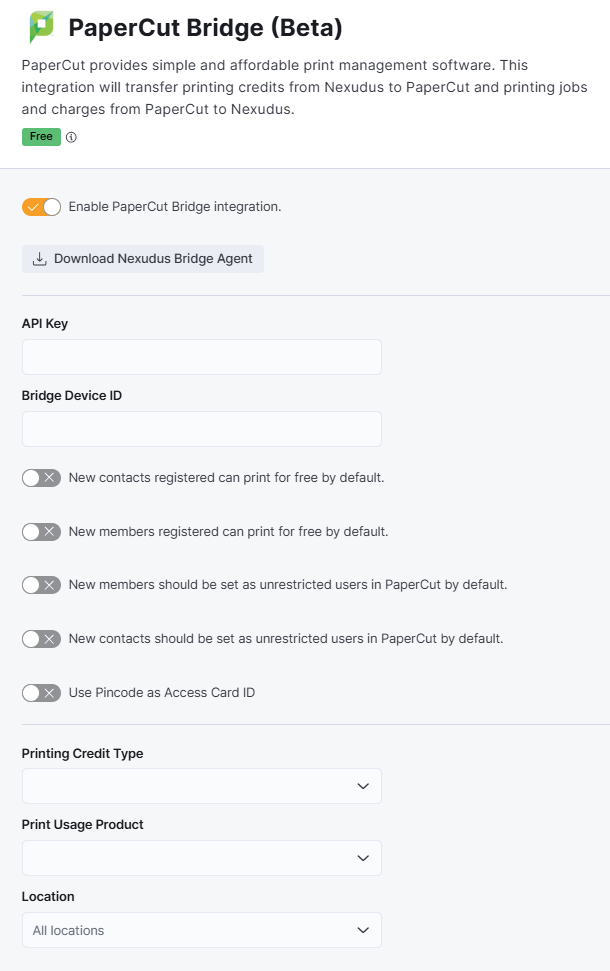
Enable PaperCut Bridge integration
This toggle controls whether the integration is on or off. Toggling this off cuts the connection between Nexudus and PaperCut. No more user access or sync will happen until you toggle it back on and reconnect the integration.
API Key
This field lets you add the authorization token required to connect your PaperCut account to Nexudus when enabling the integration.
You don't need to update this key after the initial setup unless you switch to a new PaperCut account or change your token for security reasons.
Bridge Device ID
This field lets you add the device ID of your Nexudus bridge agent dedicated to PaperCut when enabling the integration.
You don't need to update this key after the initial setup.
New contacts registered can print for free by default.
This setting will automatically allow new contacts to print as much as they'd like for free.
You should only enable this setting if you're using the Free unlimited printing pricing model.
You need to use the bulk edit feature for existing contacts.
New members registered can print for free by default.
This setting will automatically allow new members to print as much as they'd like for free.
You should only enable this setting if you're using the Free unlimited printing pricing model.
You need to use the bulk edit feature for existing members.
New members should be set as unrestricted users in PaperCut by default.
This setting will automatically enable new members to print as much as they'd like in PaperCut. Nexudus will charge them for their printing based your pricing models.
You should only enable this setting if you're using the Pay-per-print Only or Credits and Pay-per-print pricing models.
You need to use the bulk edit feature for existing members.
New contacts should be set as unrestricted users in PaperCut by default.
This setting will automatically enable new contacts to print as much as they'd like in PaperCut. Nexudus will charge them for their printing based your pricing models.
You should only enable this setting if you're using the Pay-per-print Only or Credits and Pay-per-print pricing models.
You need to use the bulk edit feature for existing members.
Use Pincode as Access Card ID
This toggle lets you make customers' default PIN in Nexudus the PIN code they can use to release PaperCut prints.
Printing Credit Type
This field lets you add your printing credit type when enabling the integration.
You should only add a printing credit type if you're using the Credits Only or Credits and Pay-per-print pricing models.
Changing the credit type will invalidate any existing printing credits customers already have in their accounts.
Print Usage Product
This field lets you add your product dedicated to printing when enabling the integration.
You should only add a print usage product if you're using the Pay-per-print only or Credits and Pay-per-print pricing models.
Changing the print usage product can result in your customers being incorrectly invoiced for their printing.
Location
This setting lets you select the locations where you'd like to enable the integration. You can select a specific location or enable the integration for All locations.